Secret Key Recovery
How-to Guide
This guide explains how to recover a lost secret key and generate a new one for your Sphene account.
Why You Might Need This
You may need to recover or regenerate your secret key if:
- Lost secret key: You lost your original secret key and need a new one
- Security concerns: You want to replace your existing key for security reasons
Generating a New Secret Key
If you lost your original secret key, you can generate a new Secret Key.
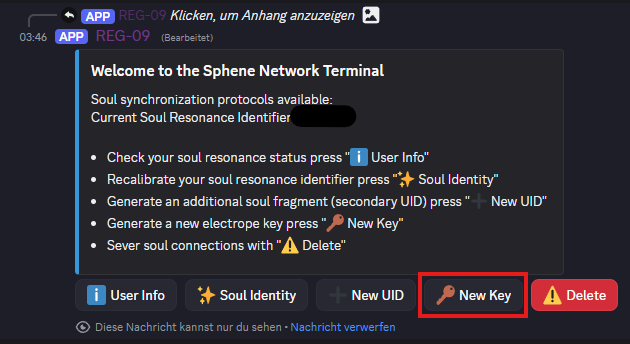
Generate a New Key
Use the Discord bot to create a New Secret Key for your existing account by clicking the New Key button.
Troubleshooting
Secret Key Not Working
- Ensure you copied the entire key (no extra spaces)
- Check that the key only contains A-F and 0-9
- Try reconnecting after adding the key
Discord Bot Not Responding
- If the Discord bot is not responding, it may be due to a network error.
- Try contacting a moderator if the bot is unresponsive
Security Best Practices
- Never share your secret key with anyone
- Keep a backup of your secret key in a secure location